Secure VPN-Safer Internet
- 4.7
- Rating
- 100.00M
- Installs
- Free
- Price

 Analysis by App-foxy
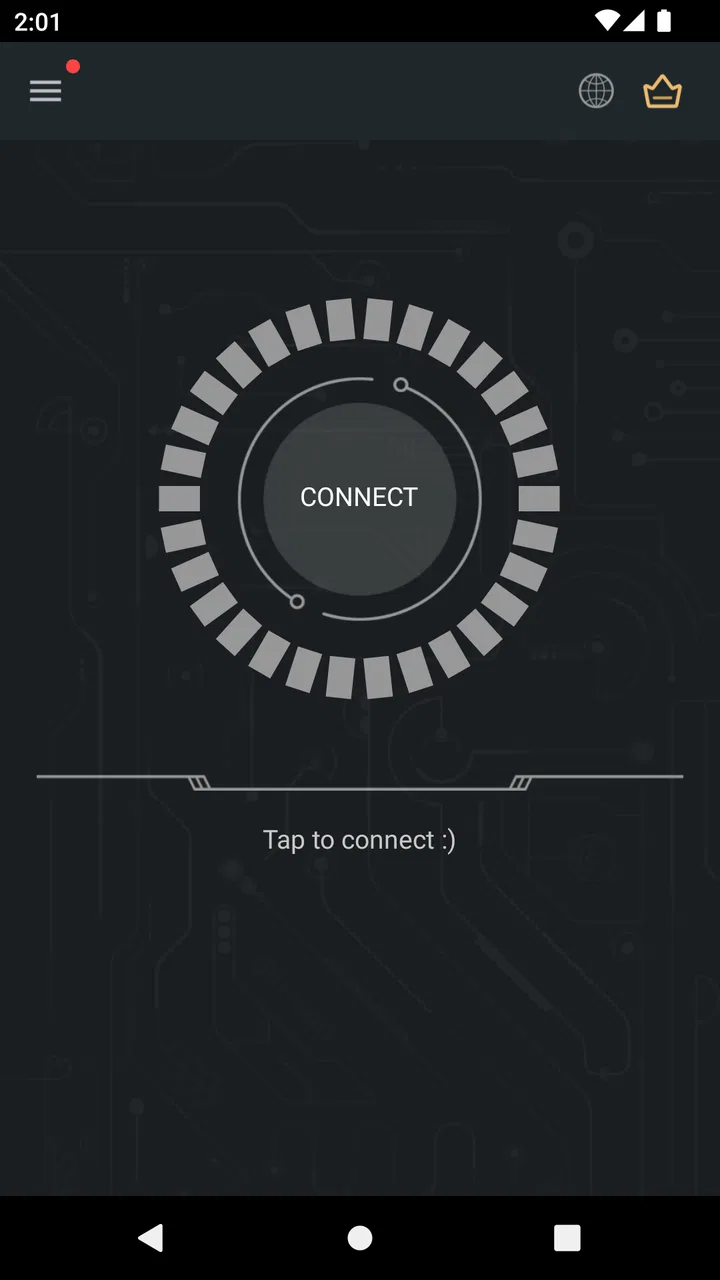
Secure VPN-Safer Internet is the kind of tools app that makes a strong first impression because its purpose is easy to understand: connect to a VPN when you want an extra layer between your device and the internet. I found the setup approachable, the main action obvious, and the overall experience less intimidating than many security-focused apps. That simplicity is important, because a VPN is only useful when I remember to turn it on and feel comfortable using it.
After spending time with it, my opinion is more measured than the first-day reaction. Its real test is not the initial connection but whether it becomes a dependable habit without creating new friction. Secure Signal Inc. has positioned this free Android app in the Tools category, and it suits people who want straightforward VPN access rather than a complicated network-management dashboard. It is available for Everyone, works from Android 6.0 onward, and the current release is version 4.4.1.
From an easy first connection to a useful daily habit
I like to judge a VPN by what happens after the novelty of the first connection wears off: whether it fits naturally into a routine without making ordinary browsing feel like a project. In this section, I look at the small choices that can turn an occasional tap into a deliberate habit, then consider how that habit holds up across different networks.
You May Also Like

 Blood Strike: 2.5 Anniversary
Blood Strike’s Loadouts Turn Every Drop Into a Tactical Gamble
A close look at Blood Strike’s custom loadouts: how fast access to signature weapons reshapes its battle royale rhythm, rewards preparation, and narrows the gap between fights.

 Pandora - Music & Podcasts
Pandora’s Music Is Easy to Start, but Harder to Recover
Pandora’s strength is its low-effort path from a seed to a station. Its weak spot is how much confidence it asks you to place in connection, setup, and quiet recovery.

 8 Ball Pool
 Is Built on Rivalries, Rematches, and Routine
A close look at the rivalries, rematches, shared routines, and unanswered safety questions that turn a quick pool match into a persistent mobile community.

 Samsung Music
’s Quiet Strength Is Playing What You Already Own
Its reach comes less from spectacle than from dependable access to a personal library. That simplicity is both the app’s strongest retention engine and its ceiling.

 AccuWeather: Weather Radar
AccuWeather Review: A Quick, Clear Forecast for Everyday Decisions
For everyday plans, the best forecast is the one you can understand quickly. AccuWeather makes rain timing, radar, and local conditions easy to act on, with a few trade-offs.

 Hill Climb Racing
Why Hill Climb Racing Still Turns Crashes Into One More Run
A tiny car, a bumpy hill and one more upgrade: Hill Climb Racing keeps resurfacing because its simple chaos makes every near-miss feel personal.
More From Our News Desk
View All News


Why the first week feels inviting
During the first week, Secure VPN-Safer Internet feels focused. I do not need to understand networking terminology before trying it, and the central workflow is clear enough for casual users: open the app, choose the connection action, and return to browsing or using another app. That low entry barrier is one of its strongest qualities. Someone who has never used a VPN can understand the basic purpose without first studying servers, protocols, or routing rules.
The app is especially appealing when I am moving between different networks. At home, I may not think about a VPN every time I browse. In a café, hotel, airport, library, or shared office, however, I am more conscious of the connection I am using. Secure VPN-Safer Internet gives me a simple routine for those moments: connect before handling an account, checking private messages, or working with information I would rather not expose on an unfamiliar network.
That does not make a VPN a complete security solution. It cannot replace careful password habits, device updates, two-factor authentication, or sensible decisions about which links and apps I trust. I also would not treat the connection as a guarantee of anonymity. The useful way to think about this app is as one protective layer, not a magic cloak for everything I do online.
The first-week experience also reveals an important trade-off. A simple interface is friendly, but it leaves less room for people who want detailed control. Advanced users may expect extensive connection choices, technical explanations, or granular behavior settings. If your priority is to tune every part of a VPN connection, a specialist service with a richer control panel may suit you better. Secure VPN-Safer Internet is aimed more at getting connected than at teaching me how every underlying decision is made.
Where it fits into an ordinary day
A realistic use case is a remote-work afternoon. I take my Android phone to a café, connect to the local Wi-Fi, open the VPN, and then review work messages or access a service that I use regularly. When I leave, I disconnect rather than leaving the VPN running automatically out of habit. That small routine is practical because it separates “I am on a network I do not fully control” from “I am back on a connection I already trust.”
Another useful scenario is travel. I may use the app while checking reservations, reading directions, or signing in to an account from a hotel network. The benefit is not that every website suddenly becomes private in every possible sense; it is that the VPN can reduce my exposure on a network shared with many other people. I still avoid entering sensitive information into suspicious pages, and I still check that the connection is active before assuming it is protecting the session.
One tip I found valuable is to make the VPN part of a specific trigger rather than leaving the decision vague. For example, I can connect whenever I join public Wi-Fi, then disconnect when I return to mobile data or my home network. This is more sustainable than promising myself I will remember to use it all the time. A security tool that fits a repeatable situation has a better chance of earning permanent space on my phone.
What the large user base tells me—and what it does not
The app has passed one hundred million installs, carries a 4.7 average from around two million ratings, and has roughly sixty thousand written reviews. Those figures tell me that the basic idea has broad appeal and that many people find the app usable enough to keep around. They do not tell me that it is the best choice for every network, region, device, or type of online activity.
I would use that popularity as a reason to investigate the app, not as a substitute for personal testing. VPN performance can feel different depending on the network I start from, the destination I connect to, and what I am doing online. A quick connection for reading may feel fine while a demanding activity exposes delay or instability. The practical question is whether it behaves well enough for my own routine.
Month-to-month value depends on repetition
After the novelty fades, the app’s value becomes less dramatic but potentially more useful. I am not opening it to admire a new feature; I am opening it because a familiar situation calls for a VPN. That is a good sign for a tools app. The best long-term utility often comes from a small action that solves the same problem repeatedly, not from constant entertainment or a steady stream of new options.
For me, the month-to-month value is strongest if I regularly use public or shared networks, travel with an Android phone, or want a quick way to add VPN protection before browsing. It is weaker if I spend nearly all my time on a trusted home connection and rarely use unfamiliar Wi-Fi. In that case, the app may sit unused, consume attention during updates or connection decisions, and provide little noticeable benefit in daily life.
The free entry point makes it easy to test that question for myself. I can use the app long enough to see whether it fits my habits before deciding whether any optional purchase is worthwhile. In-app purchases range from $1.99 to $59.99 per item, so I would not assume that every useful option is included in the free experience. I would inspect the purchase screen carefully, understand what each item changes, and avoid paying simply because a security app makes the upgrade feel urgent.
That pricing range also changes how I judge lasting value. A free VPN can be attractive for occasional use, but a paid commitment deserves closer scrutiny. I would compare the recurring usefulness of the app with the cost of a more established alternative, especially if I need dependable access for work, frequent travel, or several devices. Secure VPN-Safer Internet makes more sense to me as a convenient starting point or occasional tool than as an automatic choice for every serious VPN requirement.
Comparing it with the usual alternatives
The most obvious alternative is not another VPN; it is doing nothing and relying on the network connection as it is. That option is simpler and avoids battery, speed, and connection-management considerations, but it gives me no additional VPN layer on an unfamiliar network. Secure VPN-Safer Internet earns its place when that extra step is relevant enough to justify opening the app.
A second alternative is a browser with built-in privacy features. That may be convenient for web reading, but it does not necessarily cover other apps on the phone. A VPN tool has a broader role because I can use it before activities that happen outside one particular browser. The trade-off is that the VPN adds another connection state to monitor, while a browser feature may feel more invisible.
The third alternative is a subscription-oriented VPN service designed for experienced users. Those products may offer more detailed controls, clearer explanations, broader device support, or a more structured account system. They can be a better fit when I need a predictable service for work, frequent travel, or a household with multiple devices. Secure VPN-Safer Internet is more appealing when I value a quick, uncomplicated Android workflow and do not need a large set of technical decisions.
I would also distinguish it from a security suite. A VPN protects the connection path in a particular way, but it is not the same as malware scanning, password management, backup, or parental controls. If I am looking for one app to handle all of those jobs, this is the wrong category. Its lasting value comes from doing one focused job conveniently, not from replacing an entire security setup.
The maintenance burden is small, but not zero
The main maintenance task is remembering when the VPN is active. I do not want to assume that every connection remains protected after switching networks, restarting the phone, or closing the app. My practical habit is to check the app’s connection state before starting a sensitive session and again when I finish. That takes only a moment, but it prevents the common mistake of confusing “I installed a VPN” with “my current activity is definitely passing through it.”
I also keep an eye on everyday side effects. A VPN can introduce delay, affect how some services recognize my location, or make a connection feel less predictable. When a website behaves strangely, a video buffers unexpectedly, or an app refuses to load, I test the simple explanation first: disconnect temporarily and compare. If the service works normally without the VPN, I decide whether that service matters more than the protection I was seeking at that moment.
That troubleshooting habit is one of the less obvious skills a new user should develop. I do not immediately conclude that the app is broken, and I do not leave it enabled blindly. I compare the same task with and without the connection, note whether the problem appears only on one network, and then choose the setting that gives me the better balance. This makes the app more useful because I am treating it as a tool with trade-offs rather than a switch that must always remain on.
Updates are another part of maintenance. The app was released on March 16, 2018, and its current version is 4.4.1, which shows that it has had a long presence on Android. I keep it updated through the normal app-store process, because connection tools need to remain compatible with changing versions of Android and changing network behavior. I also review whether I still use it after a few weeks; unused security apps can become clutter rather than protection.
Where long-term fatigue can appear
The first source of fatigue is repetition without a clear payoff. If I connect every day but never notice a meaningful difference in my routine, the action can become empty ceremony. That is why I prefer situation-based use: public Wi-Fi, travel, or a specific task where I want the additional layer. The app stays relevant when I can explain to myself why I am using it.
The second is performance uncertainty. A VPN adds another step between the phone and the destination, so I have to accept that some connections may feel slower or less direct. I would not choose this app for a task where the smallest delay matters unless I had already tested it on my own network. For ordinary browsing and account checks, the trade-off may be acceptable; for demanding real-time activities, it may not be.
The third is location-related inconvenience. Some services use network location as one signal, and a VPN can make that signal differ from my physical location. If a website shows the wrong regional content or asks me to verify my account again, I may need to disconnect or adjust my expectations. This is not a reason to reject the app, but it is a reason not to treat a VPN as invisible infrastructure.
I also become cautious when an app’s optional purchases start to dominate the experience. The free price is useful for trying the basic workflow, but I would read every upgrade description before spending money. A purchase should solve a problem I actually have, such as a feature or allowance I regularly need; it should not be an emotional response to a warning screen or a promise of “maximum” safety.
Who should keep it installed
I would recommend keeping Secure VPN-Safer Internet installed if you frequently use shared Wi-Fi, travel with an Android phone, or want a low-complexity way to remember VPN protection before certain online tasks. It is also a reasonable first VPN for someone who would otherwise avoid the category because other apps look too technical. The Everyone age rating and broad Android compatibility make it approachable for a wide range of ordinary users.
I would be more selective for people who need advanced configuration, extensive device coverage, a carefully documented professional service, or highly predictable performance for work. They should compare specialist VPN providers instead of assuming that a popular, simple app will cover every requirement. I would also skip it if I rarely use unfamiliar networks and have no concrete situation in which a VPN would improve my routine.
Before settling on it, I would run three personal checks. I would connect on my usual public network, try the websites and apps I use most, and then disconnect to see whether anything behaves differently. I would repeat that test while traveling or on mobile data if those situations matter to me. Finally, I would decide whether the connection process is easy enough that I will actually repeat it, because an ideal security tool that I forget to use has little practical value.
My long-term verdict
Secure VPN-Safer Internet earns lasting space on my phone when I use it as a focused, occasional layer of protection rather than as a promise that solves every privacy concern. Its strongest quality is accessibility: the app makes VPN use understandable enough for everyday situations, and its free starting point lowers the barrier to trying it. The developer, Secure Signal Inc., has built a tool that clearly appeals to a large Android audience, but popularity does not remove the need for personal testing.
My final judgment is positive with limits. I like it for public Wi-Fi, travel, and users who want a simple routine. I would not choose it automatically for advanced networking needs, demanding performance, or people who expect one purchase to replace a complete security strategy. The app stays valuable after the first week only if I connect for a reason, check its state, notice when it affects a service, and resist paying for options I do not need.
In other words, I would recommend trying it, then judging it by habit rather than excitement. If its quick workflow becomes a natural part of the situations where I want extra protection, it deserves a permanent place among my tools. If I almost never use unfamiliar networks or find myself constantly troubleshooting speed and access, removing it is the more honest choice. Its lasting strength is convenience, not complexity—and that is exactly why it works best for the right kind of user.
FAQs for Secure VPN-Safer Internet
01What platforms is Secure VPN-Safer Internet available on?
Secure VPN-Safer Internet is available for both Android and iOS devices. You can download it directly from the Google Play Store for Android or the Apple App Store for iOS. The app is designed to offer seamless functionality across different devices, ensuring a secure browsing experience on the go.
02Is Secure VPN-Safer Internet free to use?
Secure VPN-Safer Internet offers a free version with basic features to get you started on secure browsing. However, for advanced features, such as faster connection speeds and additional server locations, there is a premium subscription available. This ensures users have options based on their specific needs and budgets.
03How does Secure VPN-Safer Internet ensure my privacy?
Secure VPN-Safer Internet uses robust encryption protocols to protect your data and ensure your online activities remain private. It masks your IP address, making it difficult for third parties to track your online behavior. This commitment to privacy is a key feature that makes it a popular choice among users seeking secure internet access.
04Does Secure VPN-Safer Internet affect internet speed?
While using a VPN can sometimes slow down your internet due to encryption processes, Secure VPN-Safer Internet is optimized to minimize speed reduction. The app provides multiple server locations, allowing you to choose the fastest connection available. For the best experience, a premium subscription can offer improved speed and performance.
05What kind of customer support does Secure VPN-Safer Internet offer?
Secure VPN-Safer Internet provides comprehensive customer support through various channels. Users can access a detailed FAQ section within the app, as well as email support for more specific queries. Premium users may also have access to faster response times and additional support options to ensure a smooth user experience.
Pros
- Easy-to-use interface for quick setup.
- No registration required to start using.
- High-speed connections for streaming.
- Multiple server locations worldwide.
- Strong encryption ensures data privacy.
Cons
- Limited features in free version.
- Occasional ad interruptions.
- Some servers may be overcrowded.
- May slow down connection slightly.
- Not available on all platforms.

Secure VPN-Safer Internet
Gallery